The world of learning is changing fast, and educational app development is at the center of that transformation. After a massive 21.5% CAGR from 2025-2033, the worldwide education apps market is forecasted to reach USD 41.6 billion by 2033. (Source: IMARC) So, the moment couldn’t be more perfect to create an educational app that makes a real difference.
Starting from the second quarter of 2024, education is ranked as the third most popular category in the App Store and the second most popular category in the Google Play Store, which is a clear indication of the trend of educational institutions, teachers, and students turning to digital resources for their needs. (Source: Statista)
With over 15 years of experience delivering 900+ projects in EdTech, cloud-based education app, and AI-powered learning platforms, we at Excellent Webworld have helped educators and institutions develop apps that engage students, scale quickly, and integrate seamlessly with existing systems.
This thorough guide will help you organize your educational app, avoid costly mistakes, and implement strategies that improve student engagement, customization, and long-term success based on this experience.
What is an Educational App? And Why You Need Educational App Development?
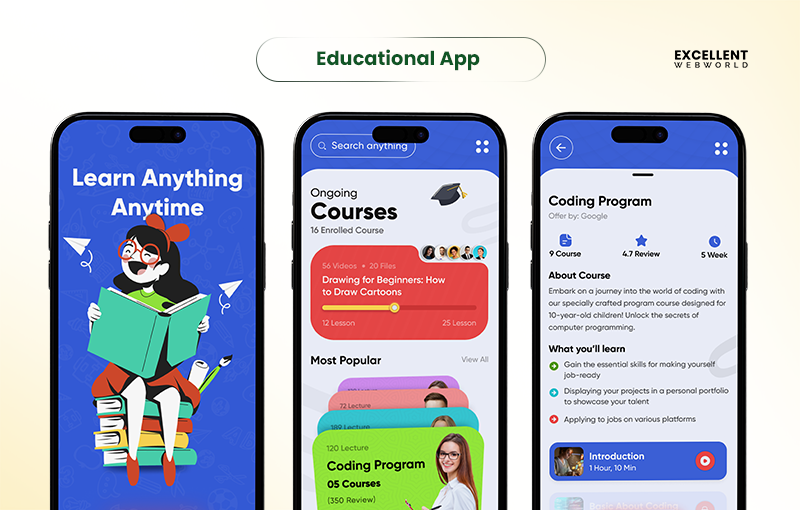
An educational app is a digital tool that delivers lessons, quizzes, and interactive content to make learning engaging and accessible.
Adopting an educational app helps schools, tutors, and businesses track progress, personalize learning, and stay up to date with trends in educational technology.
With the rise of education mobile app development, creating a dedicated learning app has become essential for modern, flexible, and scalable education solutions.
What are the Types of Educational Apps?
You evaluate educational app categories to gain clarity on what drives engagement, supports diverse learning needs, and reduces drop-offs. This breakdown helps you plan smarter education app development decisions with a clear product strategy.
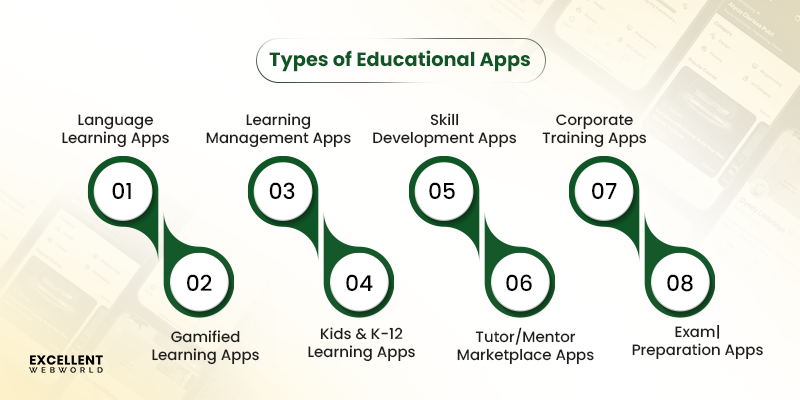
1. Language Learning Apps
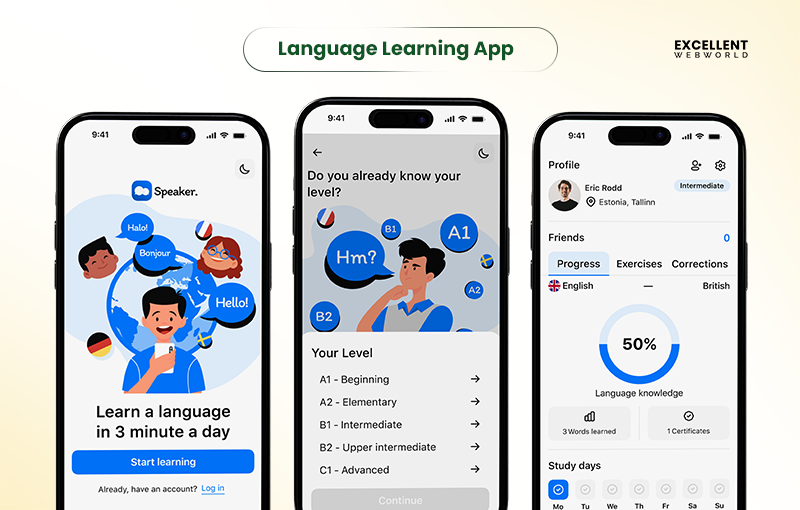
Language learning apps enable users to master new languages through interactive lessons and practice. From an app development perspective, a language-learning app like Duolingo leverages AI personalisation, speech recognition, gamification, analytics, and subscriptions to drive engagement, scalability, global adoption, and sustainable monetisation.
2. Learning Management Apps (LMS)
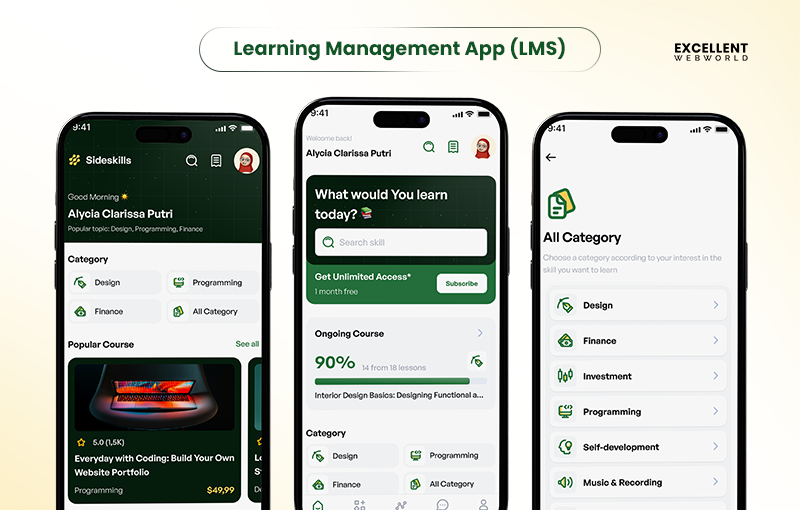
Learning Management Apps support structured training, compliance, and large-scale education delivery. From an app development perspective, the cost to build an LMS should account for integrations, cloud scalability, real-time analytics, role-based access, security, and customisation, enabling institutions and businesses to deliver standardised, measurable, scalable learning experiences.
3. Gamified Learning Apps
Gamified learning apps use points, levels, and rewards to boost engagement. From an app development perspective, they include progress tracking, adaptive challenges, leaderboards, and analytics, helping businesses reduce dropouts, improve retention, and monetise through subscriptions.
4. Exam Preparation Apps
Exam preparation apps support focused learners with mock tests, quizzes, and study materials. From an app development perspective, they leverage AI-driven personalisation, cloud analytics, progress tracking, and scalable infrastructure to deliver better outcomes, higher retention, and monetisation through subscriptions or premium courses.
5. Skill Development & Professional Training Apps
Skill development and professional training apps deliver structured learning, practical exercises, and real-world scenarios. From an app development view, they include progress tracking, AI-driven recommendations, assessments, and scalable content delivery, enabling continuous upskilling and monetization through subscriptions or certifications.
6. Corporate Training Apps
Corporate training apps enable employee learning through structured modules, assessments, and feedback. From an app development perspective, they include role-based access control, performance analytics, compliance tracking, and cloud scalability, helping organizations efficiently upskill teams and measure learning impact.
7. Kids & K-12 Learning Apps
Kids and K–12 learning apps deliver interactive lessons, quizzes, and visual content for young learners. From an app development standpoint, they use adaptive learning, parental controls, progress tracking, and gamification to drive high engagement, ensure safe usage, and enable scalable, subscription-based growth.
8. Tutor/Mentor Marketplace Apps
Tutor and mentor marketplace apps connect learners with verified experts through scheduling, chat, and virtual classrooms. From an app development perspective, they include matchmaking, payments, progress tracking, and scalable infrastructure, enabling personalized learning experiences and monetisation through commissions or subscriptions.
This classification helps you align your roadmap with this e-learning app development guide, ensuring you select the proper app type for your students, budget, and long-term growth plan.
What are the Key Benefits of Educational App Development?
Educational apps improve learning by making lessons interactive, accessible, and easy to track. They help learners, educators, businesses, and startups achieve measurable results.
| For Students/Learners | Enhances engagement and retention through interactive lessons, quizzes, and gamification. Supports personalised learning paths to accelerate skill development. |
| For Educators & Institutions | Simplifies content delivery, tracks student progress, and improves classroom management. Enables data-driven decisions for better teaching outcomes. |
| For Businesses & Enterprises | Upskills employees efficiently, reduces training costs, and ensures compliance. Provides scalable, measurable learning solutions for workforce growth. |
| For EdTech Startups | Offers a competitive edge with innovative features, user insights, and monetization opportunities. Facilitates rapid growth and market reach. |
What are the Top Educational Apps of 2026?
You need a warranty before committing time or money. Below is a clean evaluation of the top educational apps that demonstrate what works in the industry, so you can make more informed decisions when developing an educational app that fosters effective student engagement.
| Educational App | USPs |
|---|---|
| Duolingo | Gamified microlearning, strong retention loops |
| Khan Academy | Curriculum-aligned content, adaptive practice |
| Quizlet | Flashcards, AI-powered practice tests |
| Mathway | Step-by-step math solving, instant feedback |
| Google Classroom | Easy LMS integration, assignment workflows |
| Brainly | Peer-to-peer answers, AI moderation |
| Canvas Student | Full LMS support, course tracking |
| Kahoot! | Interactive quizzes, real-time engagement |
| Toca Life World | Creative play, open-ended learning |
| Gauth | AI-powered step-by-step explanations |
| Coursera | University-grade courses, certificates |
| Remind | Safe communication, class automation |
| ParentSquare | Secure school communication |
| Wayground | Classroom gamification, In-depth reports |
How to Create an Educational App? Key Steps to Follow
You need to build an educational app that promotes absolute mastery and minimizes dropout rates. These commands outline a truthful approach that you may follow.
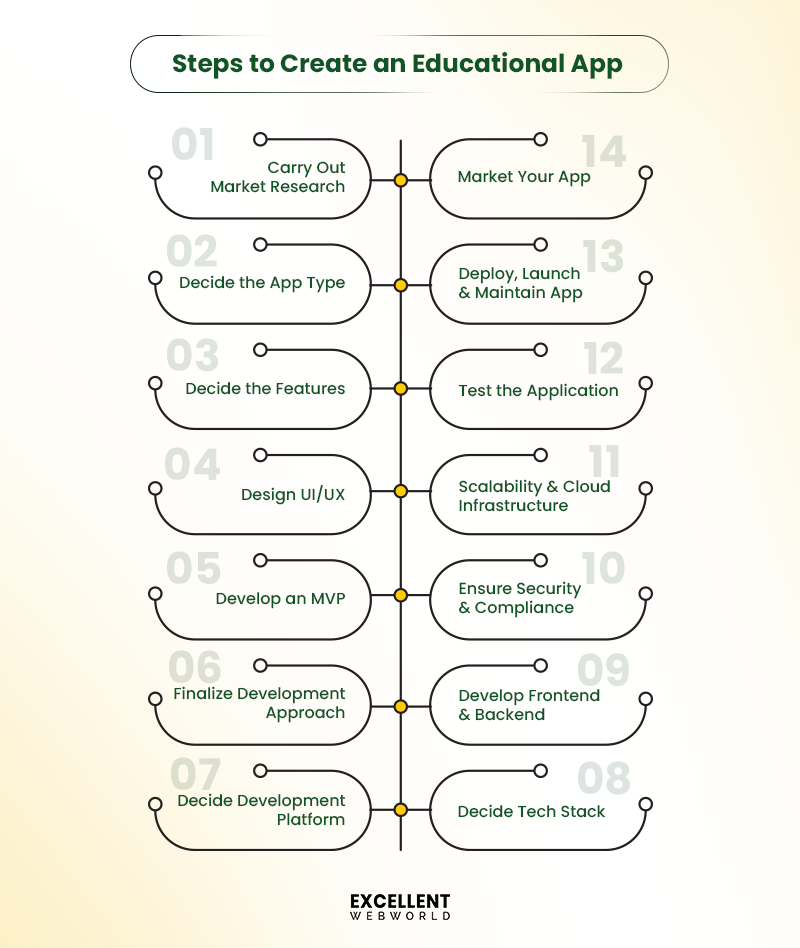
Step 1: Carry Out Market Research & Business Planning
You need insights into consumer behaviour and competitor gaps before you build an education app. Research helps you avoid low engagement and retention.
Step 2: Decide the Type of Educational App
Before you develop an educational app, define the specific learning problem you aim to solve. This selection shapes your content, your workflows, and your long-term direction.
Ask yourself:
If you plan to serve younger learners, the design needs to be simple and highly visual. This is essential for app development for kids because early beginners respond more quickly to direct cues and familiar interactions.
Step 3: Decide the Must-Have Features
You want functions that help you understand and improve your results.
Consider:
If you want more information on which features can be added to educational app development, see our upcoming section on “Core Features.”
Step 4: Design the UI and UX
Your UI needs to support fast navigation and simple choices. Students and teachers want access to classes, reports, and duties.
Things to keep in mind while designing UI/UX for an educational app:
Step 5: Develop an MVP
Keep these things in mind as you develop an MVP:
Step 6: Finalize the Development Approach
Decide between outsourcing, in-house, or a hybrid method:
Step 7: Determine the App Development Platform
Pick a platform that suits your users, your price range, and your rollout plan. Your desire influences price, overall performance, and launch pace.
Your options:
Cross-platform frameworks enable fast builds and stable performance across devices.
Step 8: Decide the Tech Stack
Strict data regulations, cloud dependability, and AI features must all be supported by your tech stack. Modern edtech app development depends on scalable systems.
Common choices:
| Category | Technology Choices |
|---|---|
| Front-End | Flutter, React Native, Swift, Kotlin |
| Back-End | Node.js, Java, Python |
| Database | PostgreSQL, MongoDB, Firebase |
| Cloud | AWS, Azure, GCP |
| Video Streaming | MUX, Agora, AWS IVS |
| Real-Time Communication | WebRTC, Socket.io, Pusher |
| AI/ML | Azure OpenAI, Custom NLP Models, ML Pipelines |
| AR/VR | ARKit, ARCore, Unity, Unreal Engine |
Choose tools that keep maintenance simple and support future growth.
Step 9: Develop the Frontend and Backend
When creating your frontend and backend, bear the following advice in mind:
Step 10: Ensure Security, Privacy & Compliance
Securing your educational app builds trust, protects sensitive data, and ensures regulatory compliance.
Step 11: Think About Scalability and Cloud Infrastructure
Planning for scalability and using the right cloud infrastructure will improve performance and user experience.
Step 12: Test the Application Thoroughly
Thorough testing ensures your educational app is reliable, secure, and delivers an optimal learning experience.
Step 13: Deploy, Launch, and Maintain Your App
Your launch needs clear communication and substantial proof of value. Schools and parents want clarity before they commit.
For deployment:
Launching your educational app is just the beginning; continuous maintenance is essential for long-term success and user satisfaction.
Step 14: Market Your Education App
Effective marketing ensures your educational app reaches the right learners and achieves sustained growth.
What are the Core Features for Developing an Education App?
You need capabilities that reduce declines in participation, enhance scholar engagement, and accommodate diverse educational desires.
Here is a list of features, primarily based on user roles, that will help you understand “how to develop an educational app” that indeed enables student success.
1. Student Panel Features
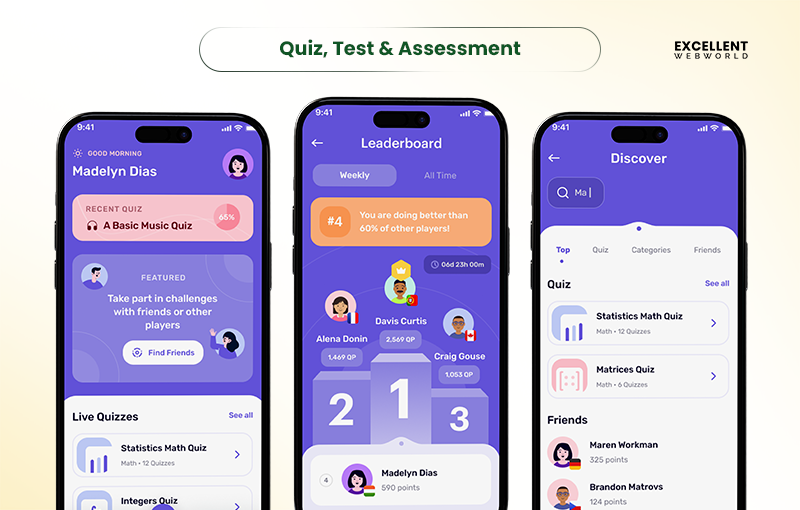
Tools designed to make gaining knowledge smooth, interactive, and trackable for students.
2. Teacher/Admin Panel Features
Tools for teachers and admins to manage content material, users, and overall performance correctly.
3. Advanced Features
Enhancements that make studying more engaging, personalized, and up-to-date.
What are the Common Challenges for Educational App Development?
Here are the key challenges that you may encounter while developing an educational app:
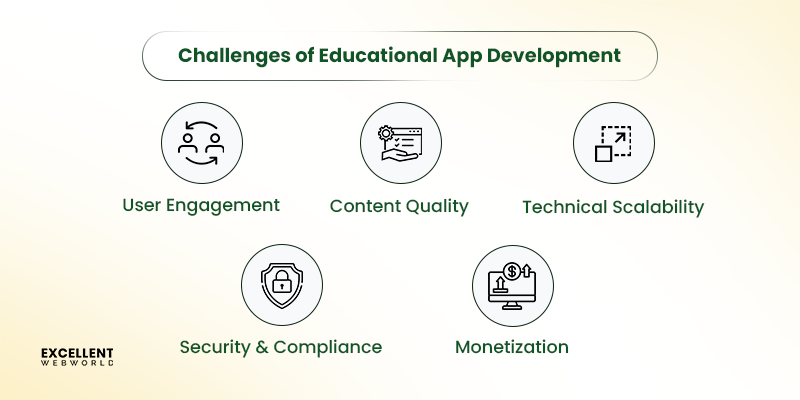
2. Add Social Elements to Build Community
3. Create Bite-Size Lessons for Higher Completion Rates
4. Use Personalization to Reduce Drop-Off
What are the Key Lessons to Learn from Top Educational Apps?
Top educational apps succeed by precisely addressing engagement, accessibility, and scalability challenges. You can replicate these outcomes by applying the same proven patterns.
1. Give More Control to Users
2. Design for Equality
3. Adjust the App to Users
4. Create a Better Onboarding Experience
5. Add Parental Gates
6. Think About Every Minute Detail
How Much Does it Cost to Build an Educational App?
You want clarity on budgets because each choice affects engagement, scalability, and your product’s success. The cost to create an app varies widely, but you can forecast it accurately by breaking it down by size, method, capabilities, app type, and location.
1. Cost Based on App Size and Complexity
Your app’s scope impacts time, cost, and the ability to implement advanced engagement capabilities. Understanding size and complexity helps you allocate resources wisely.
| App Size | Estimated Cost (USD) | Timeline |
|---|---|---|
| Small (MVP) | 20,000 to 40,000 | 2 to 3 months |
| Mid-Size | 40,000 to 120,000 | 4 to 6 months |
| Enterprise | 120,000 to 300,000+ | 8 to 12 months |
2. Cost Based on Development Platform
The choice of platform (Android, iOS, or cross‑platform) plays a significant role; Android app development cost and iOS app development cost tend to be more expensive, while cross‑platform is somewhat cheaper but comes with trade‑offs.
| Development Platform | Estimated Cost (USD) | Timeline |
|---|---|---|
| Android | 50,000 to 200,000 | 3 to 6 months |
| iOS | 55,000 to 220,000 | 3 to 6 months |
| Cross-Platform | 40,000 to 120,000 | 3 to 5 months |
3. Cost Based on Development Team
The size and specialisation of your team affect the cost to hire an app developer: small teams for MVPs cost less, while larger or full‑stack teams for complex apps increase costs.
| Development Platform | Estimated Cost (USD) | Timeline |
|---|---|---|
| Small team | 10,000 to 30,000 | 2 to 3 months |
| Mid-Size team | 30,000 to 80,000 | 4 to 8 months |
| Large team | 8,000 to 150,000+ | 6 to 12 months |
4. Cost Based on Development Stages
Building an educational app typically involves multiple stages, including planning, design, development, testing, and deployment, each contributing to the overall cost.
| Development Stage | Estimated Cost (USD) | Timeline |
|---|---|---|
| Planning & Research | 10,000 to 25,000 | Initial few weeks |
| UI/UX Design & Prototyping | 15,000 to 50,000 | 1 to 2 months |
| Core Development | 40,000 to 250,000+ | 3 to 8 months |
| QA & Testing | 8,000 to 25,000 | A few weeks (parallel to development) |
| Deployment & Launch | 2,000 to 5,000 | 1 to 2 months |
| Maintenance & Infrastructure | 15%–25% of the initial cost per year | Ongoing |
How to Reduce the Cost of Educational App Development?
You face pressure to deliver stronger engagement with limited budgets. You need a build approach that protects your resources and keeps your roadmap realistic. These steps help you reduce development costs without weakening the learning experience.
1. Have a Clear Technical Blueprint
You lower costs by defining your goals early. Create a detailed technical plan that aligns with student needs, LMS compatibility, cloud setup, and compliance. This provides your group with clarity and helps you create an educational app that avoids avoidable rework and delays.
2. Prioritize Essential Features
You control costs by focusing on capabilities that improve retention. Start with progress tracking, simple personalization, and core interaction flows. Release an MVP and study user behavior before adding AI, Generative AI, or gamification. This keeps your roadmap focused on outcomes that matter most.
3. Establish a Robust Error Detection Mechanism
You save money by detecting issues early. Use automated testing, cloud QA pipelines, and AI-supported reviews to prevent faults from reaching users. This protects the learning flow and supports stable educational app development.
4. Opt for Outsourcing
You reduce internal load by bringing in external specialists. Outsourcing gives you access to engineering, cloud, AI, and compliance information at a predictable price. This allows you to deliver faster, meet institutional expectations, and support future scale.
How to Monetize Your Educational App?
You want a model that supports clear revenue growth while maintaining strong learning outcomes. You intend to select a structure that protects engagement and improves financial balance.
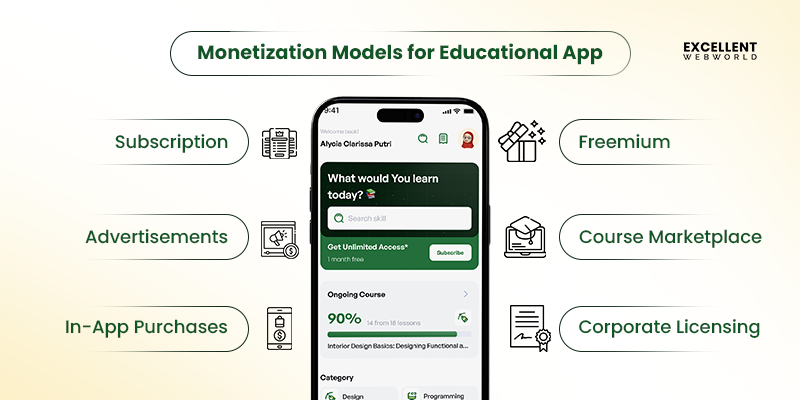
1. Subscription
You pay monthly or yearly fees for features such as personalized AI learning paths, data insights, and updated content. This works well when you need recurring revenue during educational app development.
2. Advertisements
You use ads when you need a broad reach without upfront costs for students. Keep formats non-intrusive and depend on cloud-driven targeting to uphold a clean learning flow.
3. In-App Purchases
You offer paid add-ons, including premium quizzes, AI tutors, and advanced analytics. This enables you to build engagement first, then generate sales once customers see the value the app delivers.
4. Freemium
You offer core features for free while keeping advanced features behind a paywall. This reduces drop-offs and helps users test the utility before they upgrade.
5. Course Marketplace
Let teachers sell their courses on your app. You earn a commission, students get more choices, and your app grows with diverse content.
6. Corporate Licensing
Sell your app to schools or companies in bulk. They get access for all users, and you earn steady revenue while reaching more learners.
Why Choose Excellent Webworld to Create an Educational App?
You face real pressure to build an educational app that keeps students engaged, supports diverse learning needs, scales reliably, and proves ROI. Limited resources, compliance hurdles, LMS integration issues, and rising dropout rates make the journey harder.
Excellent Webworld solves these problems with a product-first approach backed by AI, GenAI, cloud engineering, and deep EdTech consulting.
How We Help You Win:
Talk to our experts today and start building your educational app with confidence.
FAQs About Educational App Development:-
Educational app development typically takes 4-8 months. Simple apps need 1-3 months, while complex apps with AI and interactive features require 6-12 months.
Top educational apps include Duolingo for languages, Khan Academy for academic subjects, Coursera for online courses, Photomath for math problems, and Quizlet for study tools.
Reduce costs by starting with an MVP, using cross-platform development, hiring offshore developers, choosing pre-built templates, and prioritizing essential features over complex additions.
Standard models include fixed-price (set budget), time-and-materials (hourly billing), dedicated team (long-term collaboration), and hybrid approaches combining elements based on project needs.
Benefits include wider accessibility, personalized learning experiences, flexible scheduling, engaging, interactive content, progress tracking, cost-effective education delivery, and easy reach of global audiences.
Education apps cost $ 10,000 to $300,000+, depending on complexity. Basic MVPs start around $10,000, while feature-rich platforms with advanced functionality can exceed $300,000.
Current trends include AI-powered personalization, gamification, microlearning modules, AR/VR experiences, social learning features, offline access, adaptive assessments, and integration with learning management systems.

Article By


Paresh Sagar is the CEO of Excellent Webworld. He firmly believes in using technology to solve challenges. His dedication and attention to detail make him an expert in helping startups in different industries digitalize their businesses globally.